IICRC CEC Renewal Deadline Coming Up? What to Do in the Next 7 Days

Jul 17 / RestoreTech 360 Team

Key Takeaways

When your renewal deadline is close, the fastest wins come from clarity and clean paperwork. Even a small mismatch, like a missing certificate file or the wrong course details, can slow down approval.

  • Start by checking your IICRC profile to confirm your renewal date and current CEC total

  • Match the missing IICRC CE credits to an online course you can finish fast and document correctly

  • Save your completion certificate and submit documentation early to avoid renewal delays

Your renewal is close and you cannot afford a documentation mistake

You log in to your account and your renewal deadline is seven days away. You are short on CECs, and the stressful part is not only finishing a class, it is proving you finished it in a way that will be accepted.

Most online CE courses take about 2 to 8 hours to complete, but the proof and submission steps can take 1 to 3 days if you are missing a certificate, your name does not match, or you cannot find the right upload or email instructions. When the deadline is close, paperwork mistakes can cost you more time than the course itself.

By the end of this week, you want a clean set of records that answers four questions: what you took, when you took it, how many credits it counts for, and where you submitted it. If you do one thing first, make sure your documentation is correct before you hit submit.

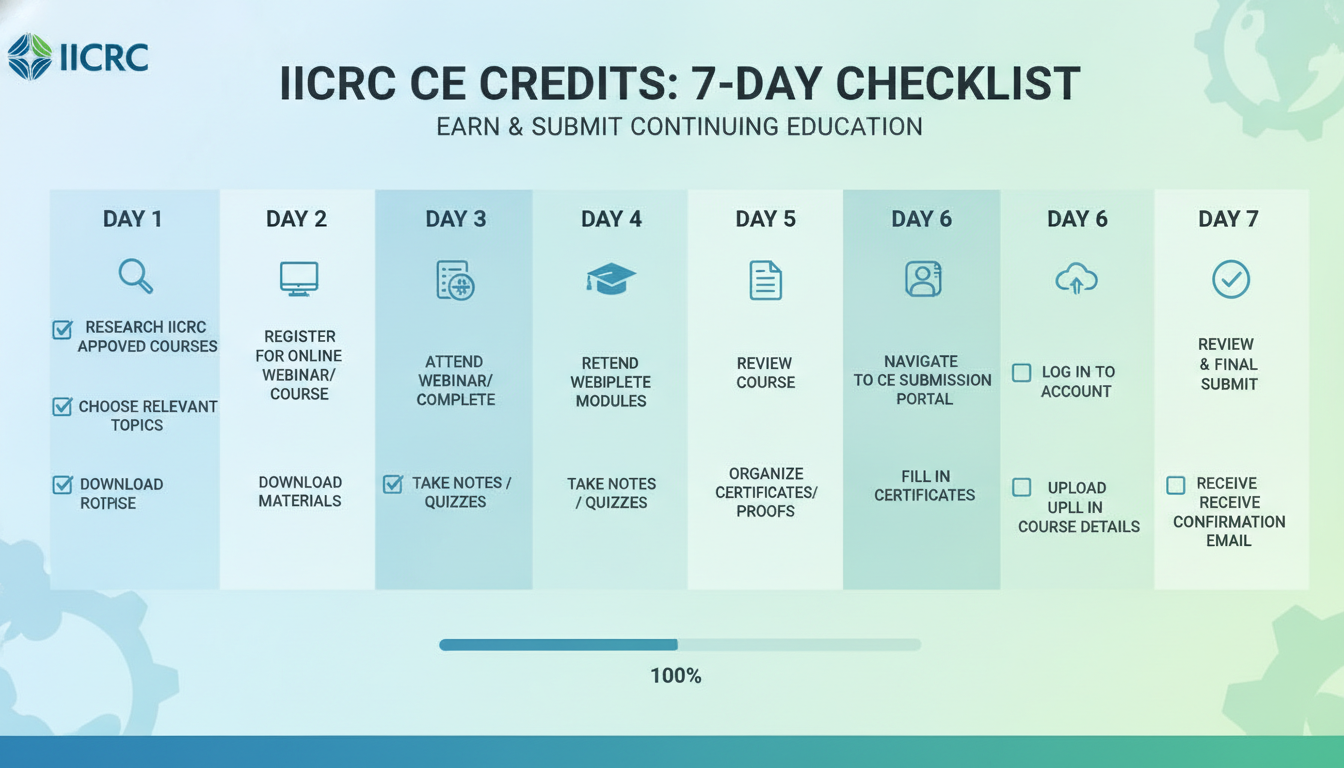
Use this quick checklist to keep your week on track:

  • Pick a course you can finish in one sitting (plan 2 to 4 hours on a weekday evening or 4 to 6 hours on a weekend block)

  • Confirm the course clearly lists IICRC CECs and the number you will earn

  • Make sure your name on the course account matches your IICRC profile (middle initial differences can slow review)

  • Save proof to one folder the same day you finish: completion certificate, receipt or invoice, and any email confirmation

  • Take screenshots if needed: course title page showing CECs, completion screen with date and time

  • Submit as soon as you have the certificate, not two days later

  • Create a simple log (notes app or spreadsheet) with three columns: course, CECs, submission date

Common mistake: waiting until the last day to submit and then discovering your certificate has the wrong name or missing course details. Fix: check the certificate fields right away, request a correction the same day, and only then submit proof.

Day 1 Verify your IICRC profile and renewal details

Next, start with the one check that prevents most last-week problems: confirm what IICRC shows for your renewal timing and your current Continuing Education Credits (CECs).

Log in and verify three items before you do anything else:

  • Your renewal deadline date

  • Your current CEC balance for the active cycle

  • Which certification cycle you are in (so you do not count older credits by mistake)

If you do one thing today, do this verification first. It works best when your account is up to date; it fails when you assume your deadline or credits are the same as last cycle.

Also, capture the numbers so you can track progress and spot issues early.

  • Take a screenshot of the CEC total and the cycle dates, or write them down in a note

  • Create a simple tracker with two lines: “CECs needed” and “CECs completed”

  • Add a reminder 48 hours after any course completion to check whether your total changed

Common mistake: waiting until the final week to look at your profile and discovering a mismatch. Fix: record today’s totals and compare after every submission so surprises show up when you still have time to correct them.

Day 2 Determine exactly how many IICRC CE credits you still need

Next, get specific about your remaining CEC hours before you spend time in the wrong class or come up short at submission time.

Start by listing what you already have in hand for this renewal cycle (course certificates, completion emails, transcripts) and what is still missing. If your record shows partial credit or a course title you do not recognize, flag it now so you can confirm it before the 7-day window gets tight.

Use this quick check to identify the exact gap and any category limits that apply:

  • Confirm your renewal cycle dates so you only count credits earned in the correct window

  • Write down your required total CEC hours for this renewal

  • Subtract the CEC hours already approved or already showing on your record

  • Check whether any category rules apply to you (for example: limits on certain types of training or a requirement for approved topics)

  • Note what proof you will submit for each missing chunk (certificate PDF, email confirmation, transcript)

Heres the catch: the most common Day 2 mistake is planning based on what you think you completed, not what your record will accept. The fix is simple: only count CECs you can document in a file you can upload or email within minutes.

So, set a 7-day mini-plan with dates, not intentions. If you do one thing today, put your target completion date on your calendar and add a buffer so you are not submitting proof at the last minute.

A simple mini-plan you can copy:

  • Required hours still needed: X CEC hours

  • Course completion target: within 3 to 4 days (gives time to troubleshoot access or retakes)

  • Proof submission buffer: 1 to 2 business days before your internal deadline

  • Internal deadline: 2 days before the actual renewal deadline

  • Final check: confirm your submission package is saved in one folder (certificate + any receipt or confirmation email)

If youre short on time, skip researching multiple providers today and just confirm the number of hours you need and the latest date you can finish. That makes Day 3 a straight execution day instead of another planning loop.

Days 3 to 7 Complete an online course and submit proof without delays

Next, pick an online course that matches your remaining hours and the real time you have left this week. If you need 3 to 6 hours, choose a course you can finish in one focused block instead of splitting it across multiple nights where life and work can interrupt.

If you do one thing, do this: schedule a single finish line on your calendar, such as a 2-hour block on Day 3 and a 2-hour block on Day 5, then plan to submit proof on Day 6. This works best when you can protect a quiet time window; it fails when you try to squeeze the course into 15-minute gaps between jobs or calls.

Also, treat the certificate like a document you cannot replace quickly. As soon as you pass, download the certificate and store it twice so you are not searching your inbox at the last minute.

Use this quick checklist:

  • Save the certificate PDF to a folder named with the year and “IICRC CE”

  • Email a copy to yourself or save it to a second storage location

  • Screenshot the completion page if the certificate link takes time to generate

  • Submit the documentation as soon as you have it, not on the final day

  • Keep a short note with the course name, completion date, and hours for easy entry

That said, the most common mistake is waiting to submit until the deadline day, then finding out a file is missing, the wrong document was uploaded, or the upload did not go through. The fix is simple: submit proof within 24 hours of completion and set a reminder for the next morning to confirm it shows up correctly in your records.

If you’re short on time, skip shopping for the “perfect” course topic and pick the shortest course that covers your remaining hours and can be completed end-to-end. A finished course plus submitted proof beats an unfinished plan every time.
Closing remarks

So keep one idea in front of you this week: sooner is smoother. The earlier you verify your profile, finish your remaining credits, and submit your proof, the less risk you carry from missing details or last-minute delays.

If you do one thing today, do the smallest action that removes uncertainty. Pick one:

  • Log into your IICRC profile and confirm your renewal date, ID, and contact info

  • Choose the course you will complete this week and block 60 to 90 minutes on your calendar

  • Gather your completion record and prepare your submission so you are not hunting for files later

Complete your IICRC continuing education credits online before your renewal deadline

So if your renewal date is close, the fastest way to reduce risk is to finish the remaining hours online this week, not “sometime soon.” Pick a course that matches your exact remaining CEC hours and block time on your calendar, for example two 90-minute sessions or three 1-hour sessions, so you can complete it without rushing at the end.

If you do one thing, do this: choose based on hours needed first, topic second. This works best when you already know your required hours; it fails when you guess and end up short, forcing you to scramble for another course.

Next, plan for the paperwork, not just the course. Aim to download your completion certificate immediately after finishing and submit your documentation the same day so you have buffer time for any fixes.

Common mistakes that slow renewals and the quick fix:

  • Waiting to submit proof until the last day, then finding a missing detail

  • Uploading the wrong file version, instead of the final certificate PDF

  • Submitting without checking that your name and credential number match your IICRC profile

If you’re short on time, skip extra note-taking and focus on completion, certificate download, and submission confirmation.