RestoreTech 360 Team
Aug 21

IICRC Certified Firm Renewal: How Business Accreditation Connects to Technician CECs

Key Takeaways

  • Certified Firm renewal keeps your business listed and eligible to market IICRC branding, while technician renewals depend on each person’s CEC compliance

  • Staff percentage and roster requirements can jeopardize firm status if technician credentials lapse or turnover isn’t tracked

  • A simple automated renewal workflow reduces lapses during peak loss seasons and protects your renewal continuity

When a busy loss season hits and your IICRC status suddenly lapses

During a surge of claims, it can happen fast: a key tech’s credential expires mid-month, your team is already booked out 10 to 14 days, and your company listing drops right when adjusters are searching. The damage is not just admin stress, it is lost visibility and awkward calls with partners asking why your status changed.

A practical benchmark is to plan for 60 to 90 days of buffer time before renewal deadlines. That window covers the slow parts that usually cause surprises: confirming CECs (continuing education credits), processing payments, and waiting for approval status to update across accounts.

Next, separate what belongs to the firm from what belongs to the individual so you do not chase the wrong fix at the worst time. If you do one thing first, do this quick triage in 15 minutes:

  • Check whether the lapse is at the firm listing level or the technician certification level

  • List which techs are currently active on jobs and which certifications are tied to those roles

  • Pull renewal deadlines for the next 90 days into one place (calendar, spreadsheet, or task tool)

Here’s the catch: paying a renewal fee may not restore status if the missing piece is an individual tech’s CECs still unverified. But if the firm record is out of date, a fully renewed tech may not prevent the listing from dropping.

By the end of this section’s workflow, you should be able to map each renewal task to the right owner: office admin handles firm-level renewals and receipts, while each technician confirms their own CECs and submission status. If you are short on time, skip building a full tracker today and just set a recurring 90-day review for two roles: your lead tech and your admin, so nothing expires mid-month again.

Certified Firm management vs individual technician renewals

Next, separate what the business renews from what each person renews, because they are tracked differently and can lapse for different reasons. A common failure pattern looks like this: the office pays the firm renewal, but two techs miss their renewal window, and now the company is still in good standing as a firm while the field team’s credentials are not.

If you do one thing, keep two lists: one for the firm renewal date and requirements, and one for every technician’s renewal month, fees, and continuing education credits (CECs). When you only track “the company is renewed,” you lose visibility into the individual certification statuses that customers, TPA portals, and project documentation may still check.

Here’s what Certified Firm renewal typically covers at the business level:

  • The firm’s listing in the master registry so clients can verify your company

  • Eligibility to use Certified Firm branding in marketing and proposals

  • Business-level compliance items tied to maintaining the firm credential

But technician renewal is personal and must be handled person by person:

  • CEC completion, often measured across a renewal period for each certification

  • Individual renewal fees tied to each technician’s credentials

  • Each technician’s IICRC certification renewal status, which can differ even inside the same crew

Here’s the catch: firm renewal is not a “blanket renewal” for staff. It works best when the office also tracks each credential holder’s CEC progress monthly; it fails when you wait until a week before renewal and discover a tech is short on credits.

Staff percentage rules that protect your Certified Firm branding

Next, treat staffing ratios as a living metric, not a once-a-year form you fill out during renewal. In practice, you are tracking two numbers: how many certified technicians you have on payroll and how many total field technicians you have who touch restoration work. The ratio can shift fast when someone changes roles, moves to sales, goes part-time, or starts riding along as a helper.

Here’s the catch: the most common failure is counting “qualified in spirit” instead of “certified on paper.” If a technician’s certification expires, they move from certified to non-certified overnight, even if they are still doing the same work the next morning. If you do one thing, keep a single roster that shows, for each tech, their current role, last active job date, and certification expiration month.

Also, set a monthly audit that takes 30 to 45 minutes and happens on the same day every month (for example, the first Monday). You are looking for changes that quietly lower your certified percentage: an unexpected departure, a seasonal hire added to the field roster, or a lead tech switching to estimating. If you’re short on time, audit only hires, departures, and expirations, then schedule a deeper review quarterly.

Use this monthly compliance checklist to stay ahead:

  • New hires added: confirm whether they are counted as field techs and whether they are already certified

  • Departures and leaves: remove anyone no longer active, and re-check your ratio immediately

  • Role changes: estimator, project manager, warehouse, and office moves should update the roster the same week

  • Certification expirations coming in the next 60 days: assign a plan for the technician’s renewal steps and target date

  • Expired certifications: flag as non-certified until renewed, and adjust dispatching if your ratio is tight

  • Backup technicians: identify at least 1 to 2 certified backups per location or team in case a lead tech leaves

  • Subcontractors or temp labor (if applicable): decide whether they should be included in your internal ratio tracking and document your rule consistently

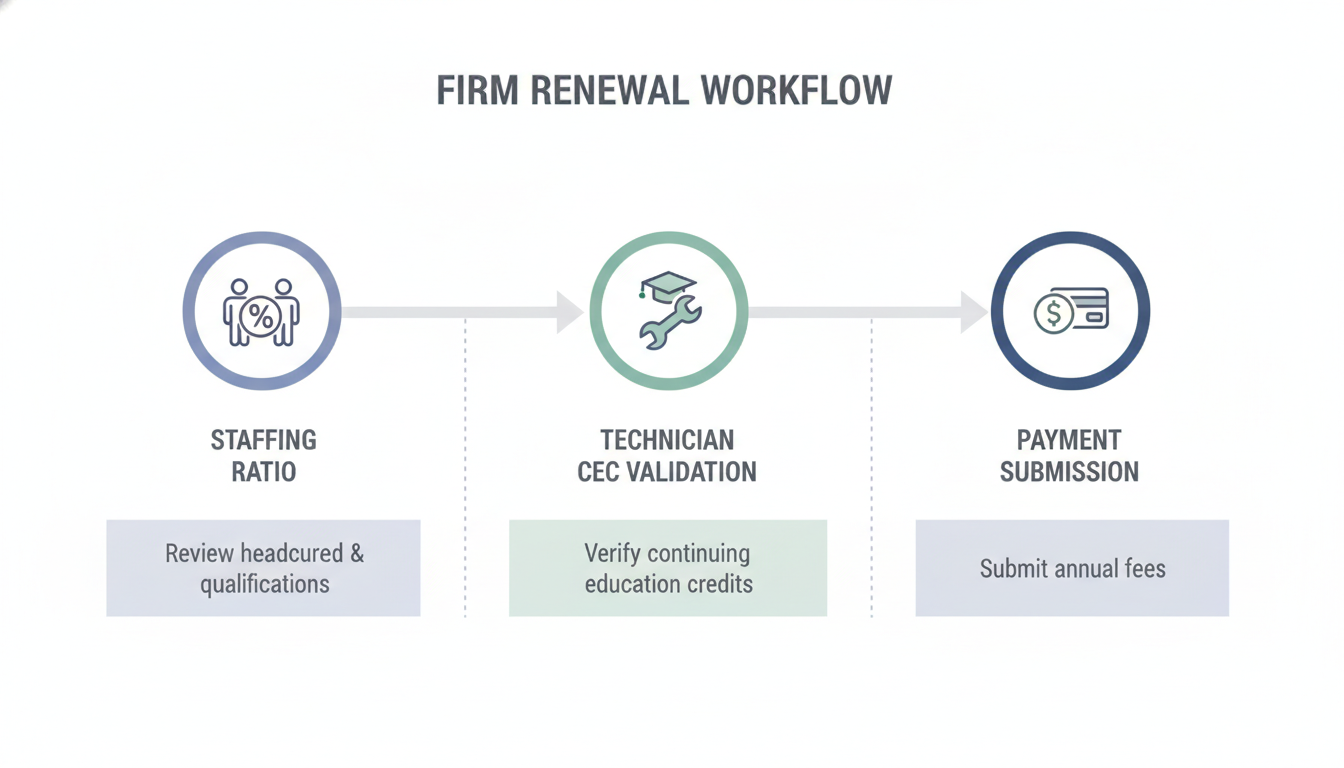
An automated iicrc renewal online workflow to prevent renewal lapses

Next, treat renewal like a repeating system, not a once-a-year scramble. A simple calendar with staged reminders gives you time to fix staffing gaps, chase missing continuing education credits (CECs), and submit payment before the deadline pressure hits.

If you do one thing, set recurring reminders at 90/60/30/14 days for the Certified Firm renewal, and add technician checkpoints between those dates. Works best when reminders create a clear action each time; fails when reminders are just “renew soon” with no owner or next step.

So assign ownership and an escalation path so tasks do not stall in someone’s inbox. A clean split looks like this:

  • Admin owner: confirms renewal window, gathers invoice info, submits payment, saves receipts in a shared folder

  • Ops owner: checks the staffing ratio against the Certified Firm requirement, flags risk if you are short by even one technician, and schedules coverage hires or subcontract support

  • Technicians: submit CEC evidence (course completion, transcripts, certificates) by the 60-day checkpoint, then re-check status at 30 days

  • Escalation rule: if CEC proof is missing at 30 days, notify ops and the technician’s lead the same day; if payment is not ready at 14 days, admin escalates to the business owner

If you’re short on time, skip building complicated software and start with a shared calendar plus a single tracker sheet that shows: technician name, required CECs, evidence received date, and renewal status.

Closing remarks

Also, it helps to treat renewal like operations work, not a once-a-year fire drill: “Compliance is a system, not a scramble.” When you build small checks into your weekly rhythm, you avoid the busy-season surprise where everyone is on jobs and nobody is watching dates.

If you do one thing today, pick a single roster check that matches how your shop runs and put it on the calendar for the next 12 months. For example:

  • A 10-minute Friday roster review: active technicians, CEC progress, and any approaching deadlines

  • A simple monthly reminder to confirm your qualifying staff percentage before hiring, layoffs, or role changes

  • A 30-day and 7-day renewal countdown assigned to one owner, not the whole team

Which single reminder or roster check will you set today to keep your firm active through the next peak season?

Get the renewal-ready checklist and workflow templates