Jun 26 • RestoreTech 360 Team

IICRC Continuing Education Credits for Certified Firms: A Staff Renewal Planning Guide

Avoid lapses: track IICRC CECs, renewal dates, fees, and certificates for every tech. Use a firm tracker and streamline renewals.

Key Takeaways

  • A firm-level renewal system helps prevent lapsed certifications by tracking each technician’s CECs, renewal dates, and fees in one workflow

  • A simple monthly cadence for audits and reminders cuts down on last-minute renewals and missing documentation

  • Your IICRC Certified Firm profile can help you manage linked technicians and renewal invoices in one place

Avoiding surprise lapses when multiple technicians renew at different times

Next, picture your busy season: one technician’s renewal is due next week, another is short on Continuing Education Credits (CECs), and a third can’t find the certificate proof you need to upload or email. When renewals are spread across different months, the risk is not one big deadline, it’s a steady drip of small misses.

In firms with 5–15 technicians, a simple monthly renewal check can cut last-minute renewal fire drills by a practical 50%. The goal is to turn renewals into a routine admin task you can finish in 20–30 minutes, not a scramble that steals hours from scheduling and billing.

Here’s why a repeatable process works better than “we’ll watch the calendar”: it tracks four things at the same time, for every technician:

  • CEC status: earned vs still needed

  • Documents: certificates, course completion emails, and any required proof

  • Dates: renewal windows, due dates, and internal reminder dates

  • Payments: invoice received, paid date, and receipt saved

Common mistake: tracking only the renewal due date. Fix it by adding one internal checkpoint 30 days earlier, so you have time to find missing proof, request replacements, or schedule a course before the deadline hits.

If you do one thing, do this: assign a single owner for the monthly check, even if different techs handle their own courses. That owner’s job is not to chase people daily, it’s to run the check, flag risks, and set the next follow-up date.

If you’re short on time, skip building a perfect system this month and start with a “red/yellow/green” status for each technician:

  • Green: CECs and documents complete, renewal date more than 45 days out

  • Yellow: something pending, or renewal date within 45 days

  • Red: renewal date within 14 days, missing CECs or missing proof

By the end of this section, you have a repeatable admin process that tracks CEC progress, documents, dates, and payments firm-wide, without relying on anyone’s memory.

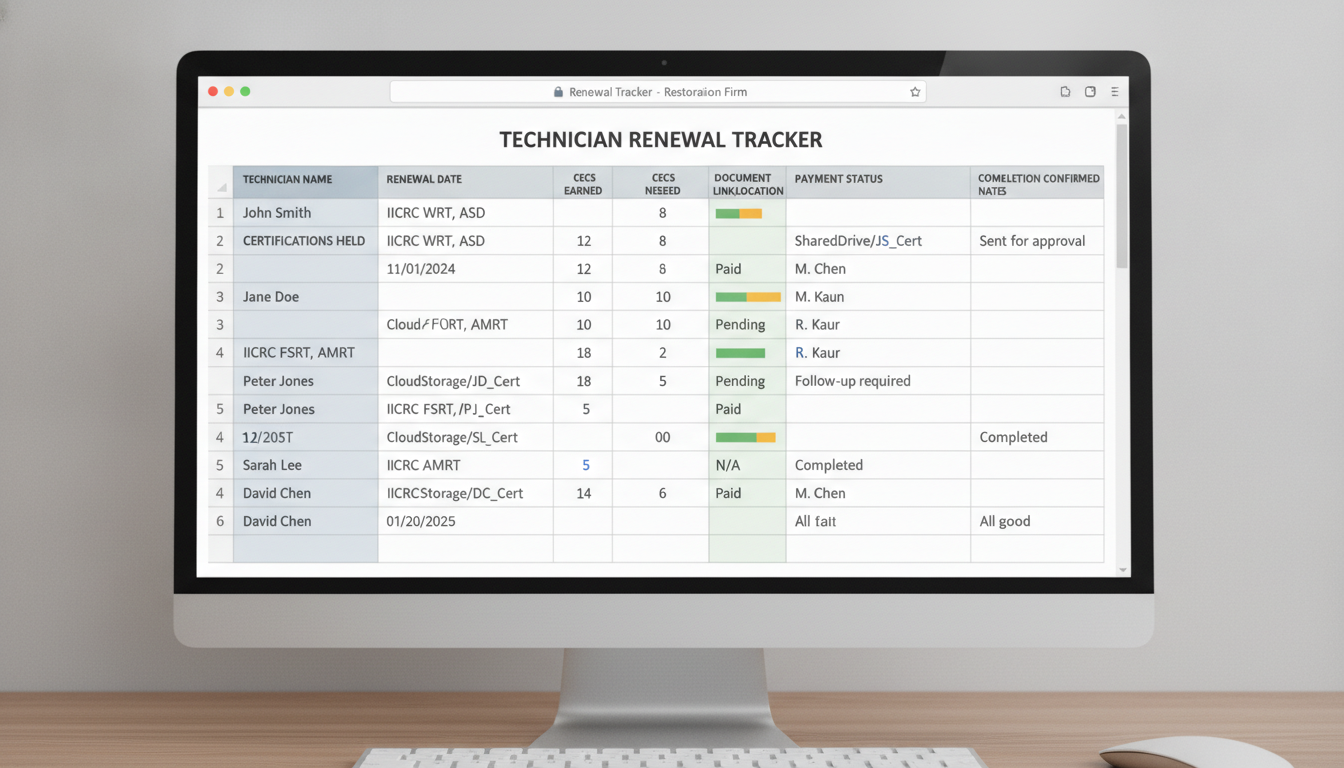
Build a firm-wide renewal tracker that actually matches how your team works

Next, get everyone out of inbox searches and sticky-note reminders by putting renewals into one shared tracker your whole firm can see. A simple, consistent view matters because most renewal slips happen when details live in three places and nobody is sure which one is current.

Start by deciding what you track for each technician, and keep it to the fields you will actually use during the year. If you do one thing, make renewal date and proof location impossible to miss, since those are the two items you scramble for when a renewal is due.

  • Certifications held (list the exact cert names each tech maintains)

  • Renewal date (use a single date format and include the year)

  • CECs earned (running total updated monthly or after each class)

  • Documentation location (folder path or link to the file)

Here's the catch: a tracker fails when ownership is vague. Assign roles so updates happen the same week training is completed, not the week someone notices a deadline.

  • Who updates records (often the office admin or training coordinator)

  • Who approves spend (owner, ops manager, or department lead)

  • Who confirms completion with each technician (their supervisor signing off that the class and paperwork are done)

If you're short on time, skip fancy scoring or color rules and just add a “Last updated” date and a “Next action” column. A common mistake is tracking only renewal dates without tracking where proof lives, so the fix is to require a document link or folder location before marking any item complete.

Track each technician from CEC progress to certificate proof

Next, treat renewal like a small paper trail, not a one-time checkbox. If a technician says they “finished the class,” you still need proof that the CECs were earned and that the updated certificate is saved where your office can find it in 30 seconds when a customer or adjuster asks.

If you do one thing, do this: use one standard checklist for every technician, even if they take different courses or renew in different months. Consistency matters more than the tool you use.

Use a checklist that keeps all three pieces together:

  • CEC requirement status: required IICRC CECs, earned-to-date, and what is still missing

  • Course completion proof: course name, completion date, and a saved receipt, transcript, or completion email (PDF or screenshot)

  • Updated certificate copies: the newest certificate file saved with a consistent name (for example: Lastname_Firstname_IICRC_Cert_YYYY)

Common mistake: tracking “registered” or “attended” as if it equals credits earned. Fix it by only marking a course complete after you have a file saved in the technician’s folder and the tracker notes where it lives.

That said, checklists only work when missing items trigger action, not hope. Add escalation rules so a technician who is busy on jobs does not quietly run out of runway.

Use simple reminders that tighten as the deadline gets closer:

  • 30 days out: reminder to submit any missing completion proof

  • 14 days out: reminder plus a 10-minute admin check-in to confirm what is outstanding

  • 7 days out: manager-level follow-up with a clear due date for documents

Here’s the catch: some teams will still ignore reminders if there is no consequence. As a last resort, set a scheduling limitation policy tied to missing proof (for example: no new lead-tech assignments until the required CEC documentation and updated certificate copy are on file). This works best when you apply it consistently; it fails when you make exceptions that confuse the team.

Use the IICRC CEC Certified Firm profile for linked technicians and renewal invoices

Next, use your IICRC Certified Firm profile as the place where account changes and invoices show up first. IICRC indicates that Certified Firms can manage linked technicians and renewal invoices through their profile, which makes it a practical checkpoint when you are keeping 5, 15, or 40 people on staggered renewal cycles.

A common mistake is treating the profile like a once-a-year login. Fix that by setting a simple routine: whoever owns renewals (office manager, ops lead, or supervisor) checks the profile on a set day each month and compares what they see to your tracker before anyone pays anything.

Reconcile invoices and renewals against your tracker

So, when an invoice appears or a status changes for a linked technician, reconcile it line by line with your internal tracker. This prevents two expensive problems: paying the wrong invoice and thinking someone is renewed when the firm profile still shows them as pending.

If you do one thing, do this quick 10-minute reconciliation step before payment and again after payment:

  • Match technician name and any identifying details in your tracker to the linked technician list

  • Confirm what the invoice covers (which technician, which renewal period)

  • Check your tracker fields: renewal due date, payment date, and current status

  • After paying, record the payment date and set a follow-up check 3 to 7 days later to confirm the status update

  • If you are short on time, skip deep notes and only capture: invoice date, payment date, and current standing

Closing remarks

Next, remember the old line: what gets measured gets managed. Treat renewals like a simple system you check every month, not an emergency you scramble through when a deadline is already close.

Also, ask this one question to decide what to change first: which technician would put your jobs at risk if their certification lapsed this month. Then pick one fix you can do today, like adding a 10-minute monthly tracker review, asking for missing certificate proof, or setting a reminder for the next renewal invoice.