Jul 24 / RestoreTech 360 Team

IICRC Continuing Education Credits for Owners Who Want Renewal-Ready Technicians on Every Job

Key Takeaways

  • Renewal-ready technicians prevent schedule disruptions caused by lapsed certifications and last-minute reassignments

  • A quarterly IICRC CEC review helps you forecast what each technician needs and assign courses before deadlines hit

  • Centralized certificate storage by technician makes audits, renewals, and customer requirements faster to prove

Keep jobs staffed when certification status changes overnight

Next, picture a Monday at 6:30 a.m.: a tech who was on three water-loss jobs is suddenly listed as expired, and your dispatch board turns into a scramble.

In practice, this is rarely about one bad week. In many teams, about 10–20% of certifications drift toward a deadline each quarter, which means you can get hit with surprises unless you treat renewals like a scheduling input, not a back-office task.

If you do one thing, build a simple 2-step “renewal-ready” check before you load the week:

  • Run a 30-day lookahead list of every tech’s certification and expiry date

  • Flag anyone inside 30 days and pre-assign coverage for their high-skill jobs (for example, drying setup, mold-related work, or any job your insurer partner expects certified staff on)

Here’s the catch: reminders alone work best when your techs are self-directed, and they fail when the crew is slammed or travel-heavy. A common mistake is waiting until the week of expiry to start the renewal course, then losing 4–8 billable hours to last-minute training and rescheduling. The fix is to reserve a small weekly training block (even 30–45 minutes) so renewals move forward without blowing up the calendar.

Protect scheduling when renewal status determines who can be dispatched

Next, treat certification renewal status like a dispatch constraint, not a “training” detail. In restoration work, a lapsed certification can block a technician from certain jobs because of insurer requirements, customer expectations, job scope complexity, or your own internal SOPs (your written standard operating procedures).

Common places status shows up in scheduling decisions:

  • Insurer or TPA requirements that specify certified labor on water or fire losses

  • Commercial customers that ask for credentials during onboarding or before the first site visit

  • Complex scopes (for example: Cat 3 water, large-loss drying, or multi-trade coordination) where you want the most current training on site

  • Internal rules like “only renewed techs lead moisture mapping” or “only renewed leads sign drying logs”

That said, swapping technicians mid-week is rarely a clean fix, even if you have someone “available.” The cost usually lands in travel time (a farther tech drives 45 to 90 minutes each way), overtime to hit promised milestones, delayed start dates on new losses, and a higher quality risk when a new person takes over documentation, readings, and customer communication.

If you do one thing, make renewal status visible before dispatch, not after the schedule is published. If you’re short on time, skip building a perfect tracking sheet and start with a simple weekly check that flags anyone within 30 days of expiring, so you avoid mid-week reshuffles.

Reduce staffing pressure when a technician lapses

Next, assume someone will lapse at the worst possible time: a big loss, a tight schedule, and a customer asking who is allowed to run the job. A common pattern is that the lapse is not discovered until dispatch day, which turns a normal shift swap into a staffing emergency.

The failure points are usually simple, and that is why they keep happening:

  • Missed emails or renewal notices going to the wrong inbox

  • Unclear ownership of tracking who is due and who is complete

  • No visibility into credits earned vs. credits required, so you cannot tell if someone is 80% done or at zero

  • Proof scattered across screenshots, receipts, and different portals, so no one can confirm status in under 5 minutes

So, define a lapsed-tech contingency plan that is short enough to follow under pressure. If you do one thing, do this: keep a pre-approved coverage list so a dispatcher can swap roles in one call, not ten.

A simple plan can include:

  • Approved alternates by role (crew lead, project manager, estimator) with 1 to 2 backups for each shift

  • Course fast-tracks for near-complete techs, such as a 2 to 4 hour option you already approve for last-mile credits

  • An escalation timeline that sets expectations

    • Same day: dispatcher flags the lapse and assigns an approved alternate

    • Within 24 hours: office confirms credits needed and what proof is missing

    • Within 72 hours: manager decides whether the tech is restricted to non-certified roles until renewal is confirmed

Here's the catch: fast-tracks work best when a technician is short a small number of credits and already has their login and payment method ready. They fail when someone needs multiple courses and you are also missing proof from prior training, so build your plan around coverage first, training second.

Build a quarterly IICRC CEC system that assigns courses and stores proof

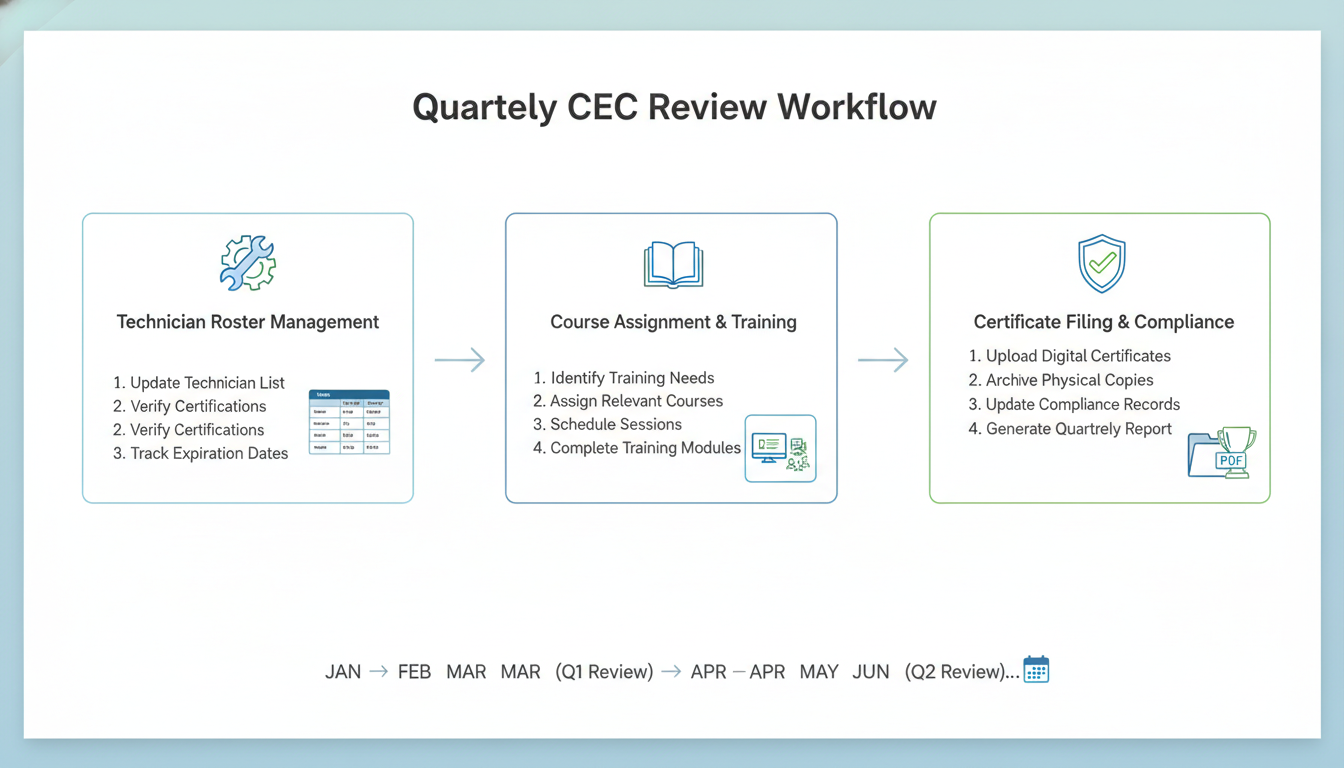
Next, treat CECs like schedule insurance: a short, repeatable quarterly check keeps you from discovering a credit gap the week a tech needs to be dispatched. Most teams can run this in 30 to 45 minutes per quarter for a small roster, then spend 5 to 10 minutes per technician only when someone shows a gap.

If you do one thing, do this: keep one roster that shows each technician’s renewal window and current credits, then review it on the same week every quarter (for example, week 1 of Jan, Apr, Jul, Oct). It works best when one person owns the process; it fails when “everyone updates it” and no one trusts the numbers.

Quarterly CEC review checklist (roster to course queue)

So, start with a checklist you can run in the same order every time, using your roster and any certificates already on file.

  • Roster check: confirm active technicians, name spelling, and primary role (lead tech, junior tech, estimator, PM)

  • Renewal windows: flag anyone renewing in the next 90 days and 60 days

  • Credit gaps: note required vs current CECs and the size of the gap (for example, 0, 1 to 2, 3+)

  • Priority roles: upgrade urgency for dispatch-critical roles (lead water techs, on-call rotation)

  • Course queue: assign the next course per person based on gap size and upcoming renewals

Here’s the catch: the common mistake is assigning the longest course first because it “covers more.” Fix it by assigning the fastest valid credit to cover the nearest renewal, then queue longer courses after the window is safe.

If you’re short on time, skip perfect forecasting and just do two actions this quarter:

  • Assign courses to anyone renewing in 90 days

  • Create a course queue for anyone with 3+ CECs missing

Store certificates by technician so audits and renewals take minutes

That said, CEC work breaks down fast when proof is scattered across inboxes, LMS screens, and text messages. Store certificates the same way every time so you can answer “Who has what?” in under 2 minutes.

Use a technician-based folder approach, with one naming convention:

  • Top-level folder: CECs

  • Subfolder per technician: LastName FirstName (or EmployeeID LastName FirstName if you have duplicates)

  • Inside each technician folder: Year folders (2026, 2025, 2024)

  • File name pattern: YYYY-MM-DD_CourseProvider_CourseName_CECsX.X.pdf

In practice, keep the storage tied to the quarterly review. When you assign a course, add a placeholder entry in your roster (Assigned, Due date). When the certificate arrives, file it immediately and update the roster to Completed with the date.

Common mistake: filing by course provider only. The fix is filing by technician first, because audits and renewal checks start with a person, not a provider.

Closing remarks

Next, remember this line when the week gets busy: “What gets scheduled gets done.” Put your quarterly CEC review on the calendar now, the same way you schedule fleet maintenance or a jobsite walk-through.

If you do one thing, pick the next quarter you will use to build your first renewal-ready cadence, then assign one owner for the full loop from start to finish. That owner should handle:

  • Pulling a 60 to 90 day renewal list

  • Assigning courses with a due date that fits your workload

  • Collecting proof (certificates or transcripts) into one shared folder

  • Running a 15 minute end-of-quarter check to confirm everyone stays dispatch-eligible

Enroll your team and assign CECs by role