
Jun 12 / RestoreTech 360

IICRC Continuing Education Credits: What Counts, What Doesn’t, and How to Stay Renewal Ready

Learn what counts for IICRC CEC renewal, what doesn’t, and how to submit your Certificate of Completion. Get trackable online CECs.

Key Takeaways

  • Only IICRC-approved activities count toward renewal, and you still need to keep proof and submit your hours yourself

  • IICRC-approved online courses are the most reliable, trackable way to earn valid CEC hours

  • Non-approved training, unsubmitted hours, and missing or expired certificates can leave you short at renewal

Know what counts before renewal week puts you in a bind

You can do everything right all year, then hit renewal week and find out your record does not match your effort. You took classes, sat through webinars, and showed up for trainings, but when it is time to renew, the hours you counted on are missing or marked as not approved.

A common measured outcome is that many techs lose hours late in the cycle because of approval and documentation gaps, not because they stopped learning. By the end of this section, you will know what usually qualifies as a CEC, what tends to get rejected, and what to collect as you go so your submission is clean when the deadline is close.

What makes a CEC valid: approval, completion, and your submission

Also, not every “training hour” becomes an IICRC Continuing Education Credit (CEC). For a CEC to count at renewal, you need three non-negotiables: the activity must be IICRC-approved, you must finish it and receive a Certificate of Completion, and you must submit the credit under your own account.

Think of it like a three-part checklist. If one part is missing, the hours may still be useful, but they are not reliable for renewal.

Here’s a quick self-check you can run before and after any class or webinar:

  • Confirm approval before you start (ask for the IICRC approval reference or confirmation that it awards CECs for your certificate type)

  • Match the topic to your credential (for example, WRT-focused content for Water Restoration Technician)

  • Finish the full requirement (some activities require a final quiz, attendance time, or both)

  • Download and store the Certificate of Completion the moment you finish (save a PDF and email it to yourself)

  • Submit your credit yourself right away (if you’re short on time, do it the same day or set a 15-minute calendar block within 48 hours)

Common mistake: assuming the provider “automatically reports” your hours. Fix: treat your certificate like a receipt and your submission like the payment step, it is the part that makes it real in your renewal file.

What earns IICRC CECs and why online is the easiest to track

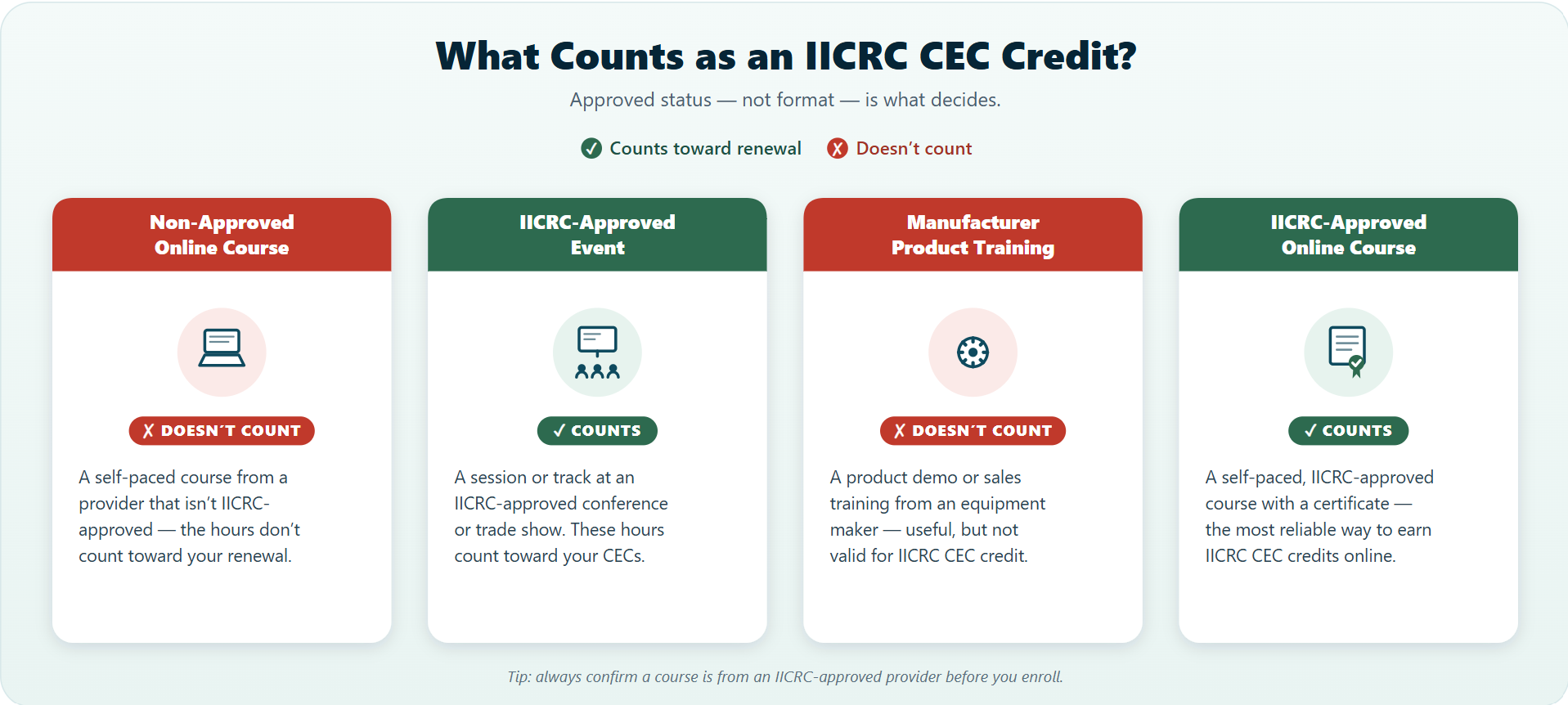
Also, once you know what makes a CEC valid, the next question is simple: what activities actually earn renewal hours you can count on.

In most cases, IICRC CECs come from IICRC-approved education and events, plus a few repeat-training scenarios. The safest move is to choose options that are clearly labeled as approved before you spend the time.

Qualifies for IICRC CECs (when approved and completed):

  • IICRC-approved online courses (often self-paced)

  • IICRC certification courses (initial or eligible ongoing training)

  • Approved events and trade shows that offer CEC-earning sessions

  • Re-taking an eligible, approved course when it is allowed for credit

The key point is reliability: approved online CEC credits tend to be the most trackable option because your completion is tied to a specific course, date, and record. That makes it easier to prove what you finished if renewal week shows a gap.

Common tradeoff to keep in mind:

  • Works best when you need predictable hours you can complete in 1 to 3 sittings and document right away

  • Fails when you rely on informal training, unapproved seminars, or “I’ll find the certificate later” paperwork

If you do one thing, do this: before you start any training, confirm it is IICRC-approved for CECs and save the completion record the same day. If you are short on time, skip anything that requires manual sign-in sheets or post-event follow-up and choose an approved online course with a clear completion record.

Urgency box: The most common ways techs lose hours without realizing it
Next, it helps to watch for the small admin misses that quietly turn real class time into zero credit at renewal.

The most common hour killers are usually simple assumptions:

  • Assuming someone else submitted your CECs (trainer, office admin, or a manager)

  • Finishing the course but forgetting to download or save the completion certificate

  • Waiting until renewal month to check your status, then discovering a course was not approved or was submitted wrong

If you do one thing today, do this quick do-now checklist. It takes about 10 minutes and can save you days of back-and-forth later:

  • Verify the course is approved for IICRC CECs before or right after you complete it

  • Save the certificate in two places (for example, phone files plus a work email folder)

  • Log your hours the same day (spreadsheet, notes app, or your company tracker)

  • Submit promptly instead of batching everything at the end

Scenario cards: Four field situations and the right move in each

Next, use these four scenario cards to make a fast call in the field before you spend time and money on hours that will not count. Each card includes what to verify first, what proof to keep, and the best time to submit so you do not end up chasing paperwork during renewal week.

If you do one thing from this section, do this: confirm the training is approved for IICRC CECs before you register or travel. Approval and documentation are what turn “good training” into “valid credits.”

Card 1: Approved online course (self-paced)

What to verify
  • The course is listed as IICRC-approved for CECs, and the hours match what you need.
  • The provider name and course title match what will appear on your completion record.
  • You can access a completion certificate or transcript immediately after finishing.


What proof to keep

  • Completion certificate showing your name, course title, date completed, and hours earned.
  • Course receipt or confirmation email with the same course title.
  • A screenshot of the course approval listing if the provider page is updated later.


When to submit

  • Submit the same day you finish, or within 48 hours while the details are easy to confirm.
  • If you are short on time, submit at least a week before your renewal deadline so you have time to fix any mismatch.


Card 2: Certification course (new cert or add-on training)


What to verify

  • Whether the certification class includes IICRC CECs, and whether all days count (some only credit the lecture portion).
  • Whether you must pass an exam or skills check to count as “completed.”
  • Whether the course is tied to a specific IICRC category that matches your certification(s).


What proof to keep

  • Certificate of completion and any exam result notice if one is issued.
  • The course agenda or outline showing training hours (helpful if hours are questioned).
  • Instructor or provider contact info in case a completion record needs correction.


When to submit

  • Submit after you have the final completion document in hand, not after day one.
  • If the class runs over multiple days, submit within a week of the final day so the dates and hours are clear.


Card 3: Approved event or trade show session


What to verify

  • The specific session is approved for IICRC CECs, not just the event name.
  • The session has a defined length (for example, 1 hour or 2 hours) and a clear topic.
  • There is a way to prove attendance (badge scan, sign-in sheet, or completion code).


What proof to keep

  • Session completion record or attendance confirmation (badge scan email, app record, or signed form).
  • A photo or copy of the event schedule showing the session title, date, and time block.
  • Your registration receipt in case your name needs to be matched to attendance.


When to submit

  • Submit within 3 to 5 days after the event while attendance records are still easy to retrieve.
  • Here’s the catch: if you attended multiple sessions, submit each one with its own proof to avoid hours getting rejected as “unverifiable.”


Card 4: Retaking a course to get credits again


What to verify

  • Whether retakes are allowed for CECs during a new renewal cycle (rules can differ by provider and approval).
  • Whether the course has a required time gap between completions, if any.
  • Whether the updated version is materially different (new edition, new content, new assessment).


What proof to keep

  • Both completion certificates showing different completion dates.
  • Any note from the provider that the course version changed (new module list, new quiz, or updated outline).
  • Your personal log that states why you retook it (new equipment, new role, or refresh before a large job).


When to submit

  • Submit only after you confirm the retake is eligible, so you do not create a submission that gets denied.
  • If your renewal deadline is close, choose a different approved course instead of gambling on a retake.

Numbered steps: A repeatable earn-and-submit process that prevents renewal panic

In practice, the easiest way to avoid renewal-week stress is to run the same small process every time you earn hours, even if you only take one class this month.

  1. Choose an approved activity

    • Confirm it is approved for the credit type you need before you start

    • If you do one thing, do this check first because approval problems are the hardest to fix later

  2. Complete the activity in one clean session

    • Aim to finish and document it the same day when possible

    • Works best when you can focus for 60 to 120 minutes, fails when you stop mid-way and forget what’s done

  3. Download your Certificate of Completion right away

    • Save it as a PDF before you close the tab

    • Common mistake: assuming you can “grab it later” and then losing login access or the download link

  4. Store the certificate in one place you will actually use

    • Use a single folder with a clear naming rule like: LastName_FirstName CourseTitle Date Hours

    • If you’re short on time, skip fancy organization and just put every certificate in the same folder today

  5. Submit your own credits as soon as you have the certificate

    • Treat submission like the final step, not an optional admin task

    • Set a simple trigger: submit within 24 hours of completion so your record stays current

Before you click away, run these “don’t guess” checks:

  • Your name matches your records exactly

  • Course title is clearly shown on the certificate

  • Completion date is correct

  • Hours listed match what you expected to earn

  • Certificate status shows completed or issued (not in progress or pending)

Consequences box: What doesn’t count and what it can cost you at renewal

Next, it helps to be clear on what won’t help you when renewal is close, because the problem usually shows up when you least have time to fix it. If a class is not approved, if you never submit your hours, or if your proof has gaps, those hours can end up counting as zero when your renewal is reviewed.

Doesn’t qualify in practice:

  • Non-approved training (good learning, but not accepted for CEC credit)

  • Hours you completed but never submitted (they still sit in your inbox, not on your record)

  • Expired certificates (the date range no longer fits your renewal window)

  • Missing certificates (you cannot prove completion when asked)

So the outcome is usually not just annoyance, it is real time and money under pressure. Techs often end up buying whatever course has an open seat this week, waiting on a renewal that should have been same-day, or risking a lapse where their certification status is not active when a job or insurer asks for it.

If you do one thing, do this: keep a simple proof folder and submit hours the week you finish training. If you’re short on time, skip organizing by topic and instead save just three items per course: completion certificate, approval info, and your submission confirmation.

Closing remarks

So when renewal season gets loud, the simplest rule is the one that holds up under pressure: If it isn’t approved, documented, and submitted, it doesn’t exist when renewal hits. Hours you can’t prove or report in time feel the same as hours you never earned.

If you do one thing, do this: treat every class like a paperwork task, not just a learning task. A common mistake is waiting until the end of the month to gather emails, PDFs, and screenshots, then discovering an approval number is missing or a certificate link expired.

Pick one habit you can repeat after every course and every field day:

  • Approval check: confirm the course is approved before you register and save the approval info in the same place you store your certificates

  • Certificate storage: save the certificate the same day in one folder with a consistent file name like 2026-06_CEC_CourseName.pdf

  • Same-day submission: submit your hours the day you finish, while the details are still in your inbox and easy to confirm

Reflect for a moment: which one habit will you start today, approval check, certificate storage, or same-day submission?

Get trackable IICRC-approved online CECs in RestoreTech 360 self-paced courses

So once you’ve got a clean earn-and-submit routine, the next step is picking online training that’s easy to document.

RestoreTech 360 offers self-paced online courses, which can be a good fit when you need consistent records for your renewal folder. If you do one thing, keep your course completion proof in a single place (for example, a folder labeled by year) so you are not hunting for screenshots the week you renew

Here’s the catch: IICRC does not endorse providers, even when courses offer IICRC-approved continuing education.

To avoid confusion, treat approvals and tracking as two separate checks:

  • Confirm the course lists IICRC approval for CECs where applicable

  • Save your completion certificate or completion record the same day you finish

  • Write down the date completed and number of hours credited in your personal log

  • If you’re short on time, skip building a spreadsheet and use a notes app with one line per course

Explore courses here: https://restoretech360.com/courses

FAQ

Do I automatically get CECs when I finish a course, or do I have to submit them myself?

It depends on the provider and the IICRC submission process. Some providers report completions for you, but others require you to submit proof. If you do one thing, confirm the submission method before you start the class

How do I confirm a course, event, or trade show is IICRC-approved before I register?

Ask for the IICRC approval details in writing before you pay. Confirm the course name, the approved credit hours, and who is responsible for reporting. If those details are vague, treat it as not approved until proven otherwise

If I retake a course, will it count again toward CECs?

Sometimes retakes do not grant new credits, even if you sit through the full class again. Here’s the catch: approval can be tied to a specific completion window or one-time credit. Check the course rules before you retake it

What if I did the training but my Certificate of Completion is missing or expired?

So start by contacting the provider and request a replacement certificate or updated completion record. Keep your registration email, payment receipt, and attendance proof as backup. If the provider cannot verify completion, you may need to earn the hours again

Do non-approved classes count if I worked in the field and “learned a lot” anyway?

No. Field experience and non-approved training can help your skills, but they usually do not count for IICRC renewal hours. If you’re short on time, focus on approved courses with a clear certificate and a clear reporting path