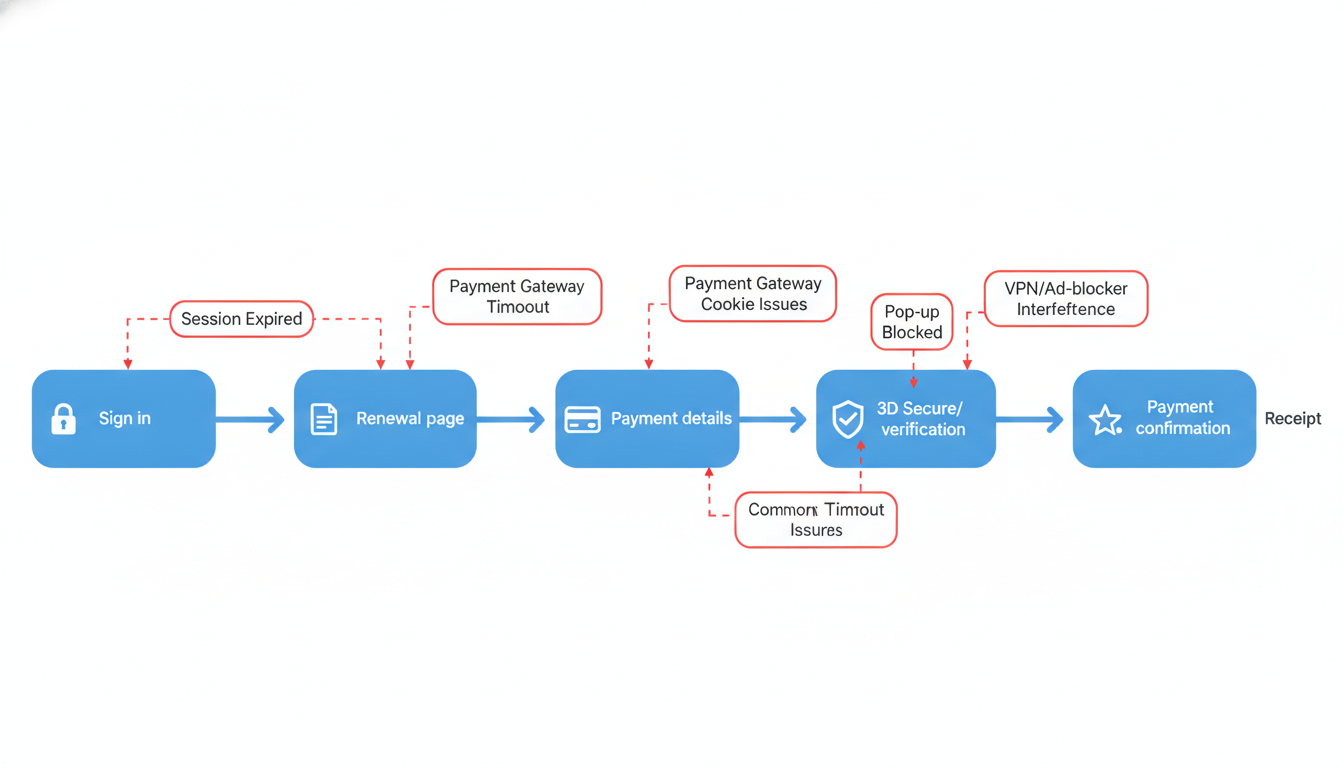
You have 10 minutes between jobs, you open the renewal portal, and the checkout spins, times out, or dumps you back to the cart. The problem is not just the lost time, it is the uncertainty of whether the payment attempt partially went through and might block your next try.
Most portals auto-timeout after about 10–20 minutes of inactivity, and that can break payment verification if the session expires mid-checkout. By the end of this section, you will have a step-by-step checklist to either finish an online renewal cleanly or document a clean support escalation.
Next, assume the portal session is the weak point and work in a tight sequence. If you do one thing, do this first: start a new session before you re-try payment, because repeated attempts inside an expired session often loop back to the cart.
Use this checklist in order (total time: about 5–12 minutes):
Open a fresh private/incognito window to clear old session cookies
Sign in and go straight to the renewal checkout without opening extra tabs
Avoid back button during checkout, use the portal’s own navigation
If you must pause, sign out and restart rather than leaving the page idle
Take a screenshot of the cart or renewal summary before clicking Pay
Click Pay once, then wait 60–90 seconds before trying again
If it loops back to cart, do not keep retrying, sign out and start a new session
Check for any on-screen message like “verification,” “processing,” or “pending” and capture it
Common mistake: rapid re-clicking Pay or opening checkout in multiple tabs. Fix: use one tab, one attempt, and restart the session between attempts so the gateway sees a clean request.
That said, sometimes it works best when you have stable signal and uninterrupted time, and it fails when you are on spotty mobile data between job sites. If you are short on time, skip extra troubleshooting and focus on evidence that support can use to trace the payment attempt.
Capture these items before you leave the checkout:
Date and approximate time of the attempt (include your time zone)
The exact step where it fails (spinner, timeout, cart loop, error message)
Screenshot of the renewal cart summary and total due
Screenshot of the final error or the loop back to cart
Any reference number, transaction ID, or “pending” message shown
The device and browser used (for example, iPhone Safari or Windows Chrome)
Tradeoff: restarting sessions can fix checkout loops quickly, but it can hide intermittent gateway errors if you never capture the message. So, restart once or twice, then switch to documentation mode and escalate with clean details.